
Tool System & Sandbox (Capability 4: Agents That Can Act)
In one sentence: agents act on the world through tools — nine built-in tools cover the shortest path, every call passes a three-whitelist sandbox and leaves a trace, and business teams extend in three tiers ordered by effort.
What it solves
An agent's value lands in actually operating systems: reading logs, sending requests, writing files, pushing notifications. Tools are the agent's hands — and hands need boundaries. Tool calls without whitelists and audit can't pass security review in an enterprise. What this enables: wiring agents into the enterprise's own ERP, CRM, and CMDB so they do real work; GitHub/Jira/Confluence integrations for engineering assistants; Prometheus and SSH for ops self-healing; and zero-code extension — pure markdown can ship a new scenario.
How it works
One abstraction: YokeTool
Built-in tools, @Tool-annotated extensions, and MCP tools are all wrapped as uniform YokeTool instances registered in the ToolRegistry (four methods: getName / getDescription / getInputSchema / execute) — the ReAct loop never sees where a tool came from.
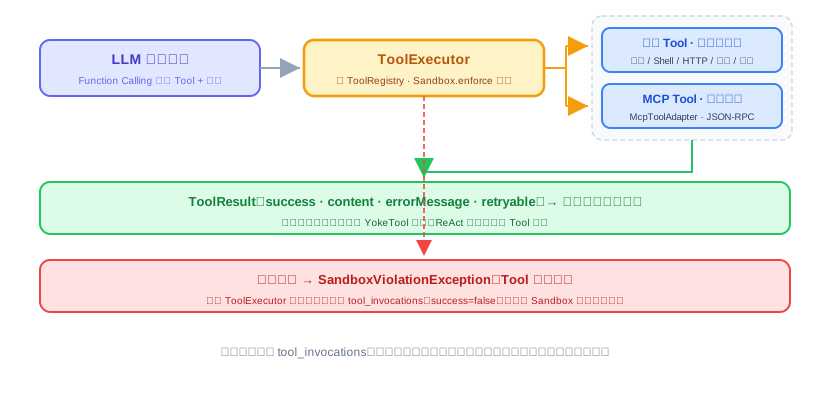
Built-in tools (nine, in five groups)
| Group | Tools | Notes |
|---|---|---|
| File | read_file write_file list_dir | Read/write/list within the path whitelist |
| Shell | shell | Command whitelist + argv passthrough (no shell interpretation) + timeout |
| HTTP | http_get http_post | Domain whitelist |
| Memory | save_memory recall_memory | Long-term memory reads/writes (owned by the Memory module) |
| Notify | notify | Push to the agent's configured notification channels |
Nine tools cover the shortest path: read and write files, run commands, call external APIs, take notes, push notifications outward.
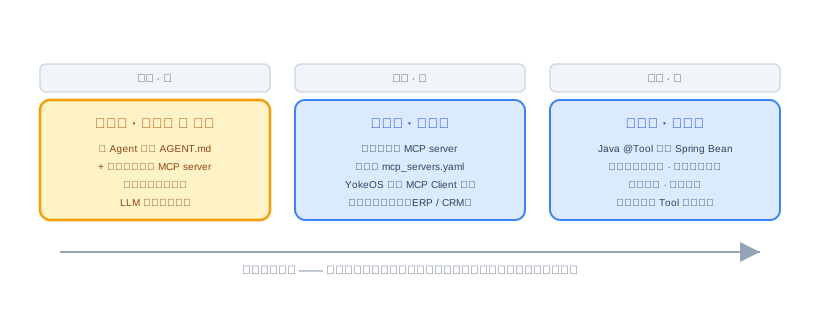
Three extension tiers, lowest effort first
| Tier | Effort | Approach | Fits |
|---|---|---|---|
| Tier 1 | Zero code ⭐ recommended | Write an agent directory + reuse community MCP servers | Describe the intent; the LLM composes the calls |
| Tier 2 | Light code | Write an MCP server in any language, declared in mcp_servers.yaml | Integrating proprietary enterprise systems (ERP, CRM) |
| Tier 3 | Heavy code | A @Tool-annotated Java Spring bean, called in-process | Deep integration, best performance |
Rule of thumb: if tier 1 works, don't use tier 2; if tier 2 works, don't use tier 3.
The sandbox: interface first, whitelist to start
The Sandbox interface expresses exactly one intent — "execute this action in a controlled environment" (enforce(action), four action types: file read / file write / shell command / HTTP request) — with nothing implementation-specific in the signature. Phase 1's only implementation is WhitelistSandbox:
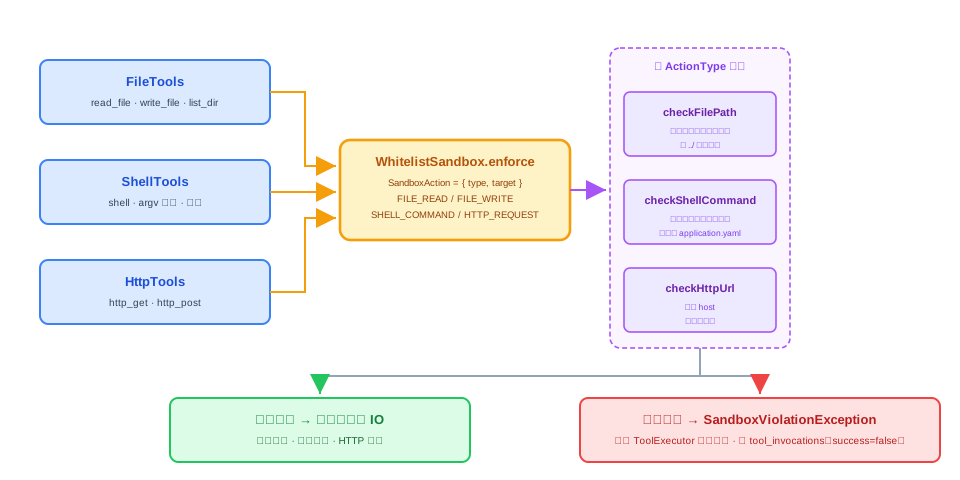
- Files: normalize the path, compare against the whitelist, defeat
../traversal; existing targets are verified by real path to stay inside the whitelist root - Shell: exact whitelist of executables; argv passed straight through, no shell syntax interpretation
- HTTP: parse the host, match wildcards (
notifypushes share the same domain whitelist)
Validation failure raises an exception, the tool aborts, and the exception rides the existing audit path into tool_invocations (success=false) — no separate sandbox audit. No Java SecurityManager — deprecated since JDK 17 and unusable on JDK 21.
Target usage
Build "push a daily GitHub PR review digest to Slack" with zero code:
- Create
.yokeos/agents/daily-pr-digest/with anAGENT.md(frontmatter declares the provider,mcp_servers: [github-mcp, slack-mcp], andschedules; the body states the task) - Reuse community MCP servers, configured in
mcp_servers.yaml - Need a fixed output format? Reference a shared skill by name in the frontmatter
Not a single line of code.
Phase 1 boundaries
- The application-layer whitelist is a deterrent: it stops a model's honest mistakes, not deliberate bypass; don't run fully untrusted code or multi-tenant workloads on it
- Installing an agent with scripts means trusting its author: whitelisting an interpreter grants code execution, and network calls made by the interpreter bypass the domain whitelist
- Container isolation (namespaces + cgroups) and microVMs arrive when upgrade signals demand — the interface stays, only implementations are added
- Whitelists are config-file-managed in Phase 1; management endpoints come in the extension phase